How to Customize Your Scooter in Kukirin Life
Kukirin Life scooter customization guide: find the tuning shop, wait there to tune, then recolor screws, add glow, and change wheels, decals and accessories.
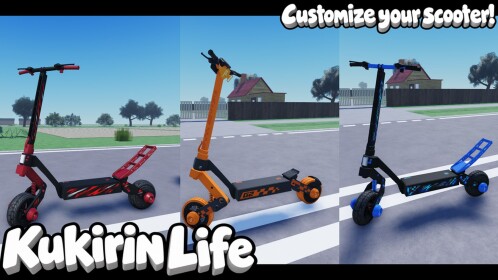
Scooter customization in Kukirin Life happens at the tuning shop. Open your map, find the shop, ride over and stay there for a moment — "if you wait here, you can literally tune your own scooter," as the gameplay walkthrough this guide follows puts it. Color options then open on your scooter part by part, and every pick shows up on the scooter right away.
You don't need to buy anything first: every player spawns with a free G2 scooter. Tuning is also a different activity from the dealership, where you talk to an NPC to buy better scooters such as the G4 Ultra — which can also be bought with Robux, "kind of pay-to-win, though," the narrator notes. At the tuning shop, you're restyling the scooter you already own.
Where the tuning shop is
Find it on your map. The narrator points it out while showing the map's event markers — the big orange circles that appear during the day for events like rideouts — and distinguishes the shop from them: "there's also the tuning shop right over here." So don't wait for an event circle: the tuning shop is its own stop. For an overview of what's where, see the Kukirin Life map.
How to tune your scooter, step by step
- Locate the tuning shop on the map and set it as your destination.
- Ride to the shop.
- Wait at the shop. That's the stated access condition: "if you wait here, you can literally tune your own scooter." The video doesn't show a specific button prompt — waiting at the shop is what makes tuning available.
- Pick a part and open its colors. The first part demonstrated is the screws: "we have a different color that we can do. So, for example, screws."
- Cycle the options and choose one. In the demo, pink gets rejected ("No pink") and yellow gets picked.
- Work through the other categories — glow, wheels, decals, accessories and hardware — the same way.
The result is instant. The scooter visibly changes the moment a pick is made, and the narrator sums up the effect as making your scooter "like super cool."
What the tuning menu lets you change
| Tuning category | What the walkthrough demonstrates | Cost as stated |
|---|---|---|
| Screws (part color) | Recoloring done live — pink passed over, yellow selected | Rainbow screws cost Robux; nothing else is priced |
| Glow | Options browsed; orange glow chosen — "this orange glow. That's super cool" | Not stated |
| Wheels | "you can do it the same" recolor process as the screws | Not stated |
| Decals | The lightning decal, recolorable between "Yellow, blue." | Not stated |
| Accessories | The wheelie bar viewed in the menu | Not stated |
| Hardware | Category named ("we got hardware"); no specific change shown | Not stated |
One cost is stated outright: rainbow screws "is going to cost Robux." No other price is mentioned for any demonstrated pick, so treat unpriced options as unstated rather than free. And as shown, these are style edits — the walkthrough doesn't demonstrate any speed or earnings effect from colors, glow or decals.
Battery and motor upgrades come from crates, not the tuning menu
Two upgrade routes sit outside the menu: "you can upgrade your battery from crates. So, if you open crates, and you can upgrade your motor as well." Crates are opened with in-game cash, which you earn by doing challenges, epic rides and tricks. The narrator recommends upgrading because it "makes that you can get way more rewards" — that's his claim, not a tested result in the video. For the upgrade routes in detail, see how to upgrade scooters, and for keeping your cash topped up, how to earn money.
Do you need to save your style?
No save or apply step is shown. Picks take effect on the scooter immediately, and the video never shows a save button or how a style carries over once you leave the shop or the server — so there's no documented save sequence to follow.
What the walkthrough leaves unconfirmed
- The exact prompt or key that opens the tuning menu once you're at the shop
- Full option lists per category — only the demonstrated examples (pink, yellow and rainbow screws, orange glow, lightning decal, wheelie bar) are shown
- Prices for anything other than rainbow screws
- Whether the wheelie bar was actually equipped or just browsed in the menu
- What battery and motor upgrades actually change beyond the narrator's rewards claim
Once your scooter looks the part, the Kukirin Life scooter colors reference collects the looks the game offers.
Related Guides
Scooter Colors
Which scooter colors are confirmed selectable at the tuning shop and what the official art does not prove.
How to Upgrade Scooters
How battery and motor upgrades come from tuning-shop crates, and how they differ from cosmetic tuning.
Map and Locations
Every confirmed landmark right now — dealership, tuning shop, rideout spots, event circles — and how the map works.